Create a vCard QR Code That Helps People Save Your Contact Details
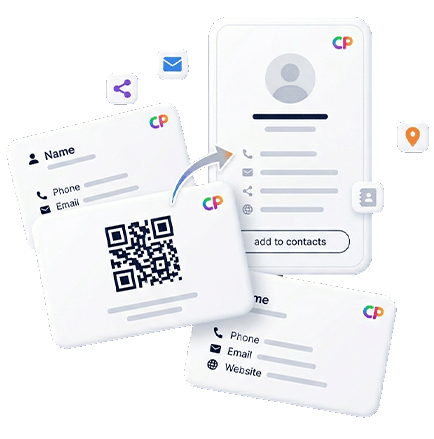
A vCard QR code should do more than expose a phone number. With Contact Portfolio, a scan can open a mobile contact page where visitors can save contact details, call, email, visit your website, open maps, submit a lead form, follow social profiles, review your business, or use a payment link from one branded QR contact card.
QR Contact Card
Give visitors a simple contact flow: scan, open the mobile profile, save details, and choose the next business action.
Contact Sharing
Turn a QR scan into a saved relationship
A good QR contact card reduces friction at the exact moment someone decides to connect with you.
Save contact faster
Help people move from a quick scan to a usable contact record. Your page can present phone, email, website, location, social links, and a clear save-contact path from one mobile screen.
Add context around the contact
A vCard alone can feel anonymous. Add a short bio, services, portfolio links, Google reviews, PayPal payment options, booking buttons, and lead forms so visitors understand why they should follow up.
Use the same QR everywhere
Place your vCard QR code on business cards, appointment cards, event badges, brochures, flyers, packaging, menus, table signs, posters, and storefront material.
Why a vCard QR code page is stronger than a plain contact file
Many vCard QR code generator tools create a static code that only contains contact data. That can be useful, but it is limited. A business conversation rarely ends with saving a phone number. A prospect may want to see your services, read a review, open your portfolio, request pricing, book a consultation, visit your location, or pay a deposit. Contact Portfolio turns the QR contact card into a richer digital business card experience.
This matters for networking, local services, trade shows, sales teams, consultants, clinics, salons, agencies, real estate professionals, creators, and support teams. The QR code can still be simple for the visitor, but the destination can be much more useful than a static file. You can guide each scan toward the next action without asking people to type a URL or search for you later.
Use the page as a contact hub
A contact hub gives visitors options without overwhelming them. Primary actions such as call, email, save contact, and open website should be obvious. Secondary actions such as portfolio, map directions, payment link, review link, and form submission can support higher-intent visitors. Because the page is mobile-first, the user does not need an app or NFC card to interact with your brand.
What to include in a vCard QR page
- Name, role, company, and a short professional introduction.
- Phone, email, website, social links, and message channels.
- Save contact or contact-card action.
- Map link, address, opening hours, or service area.
- Lead form, booking link, PayPal link, or review link.
- Printable QR code assets for offline placement.
Match the QR contact card to the visitor's next action
The best vCard QR code does not force every visitor into the same path. A networking scan, a sales scan, and a local business scan can all start from the same contact page, but each one should make the right next action obvious.
| Search intent | Best page action | Related solution |
|---|---|---|
| Save contact QR code | Show contact details and save-contact path first. | Digital business card |
| QR contact card for events | Keep the page short, scannable, and focused on follow-up. | QR code business card |
| Contact page for local business | Add maps, reviews, phone, hours, and lead form actions. | Business profile page |
| Contact sharing for teams | Use consistent branding across staff, departments, and locations. | Digital cards for teams |
vCard QR Checklist
Build a contact page people can act on immediately
Use this checklist before printing a QR code on cards, flyers, signs, badges, or proposals.
Best use cases for save contact QR codes
A save contact QR code is valuable wherever personal introduction and fast follow-up matter. Sales representatives can add it to printed cards and event badges. Consultants can place it in proposals and presentations. Local businesses can use it at reception desks or counters. Real estate agents can add it to property flyers. Agencies can use it for client-facing account managers. Event teams can connect attendees to speaker profiles or sponsor pages.
The biggest advantage is that your contact experience stays editable. If your number, website, offer, service list, or booking flow changes, your Contact Portfolio page can change too. The printed QR code continues to act as the bridge. That is why vCard QR code, digital contact card, QR contact card, and digital business card workflows should be connected instead of treated as separate one-time assets.
Turn every scan into a saved contact, profile visit or follow-up action
Use one digital business card workflow for contact sharing, vCard-style save actions, printed QR cards, team profiles and QR destinations that can change after printing.
Create a vCard QR code that does more than save a number.
Start with a branded QR contact card, then connect visitors to your digital business card, map, form, review page, or payment link.